Taubyte provides key-value databases that you can access directly from your serverless functions. Like storage, databases are instantiated on-the-fly when first used—enabling dynamic, multi-tenant data isolation without manually creating each database instance.
Creating a Database
From the sidebar, navigate to Databases and click the + button.
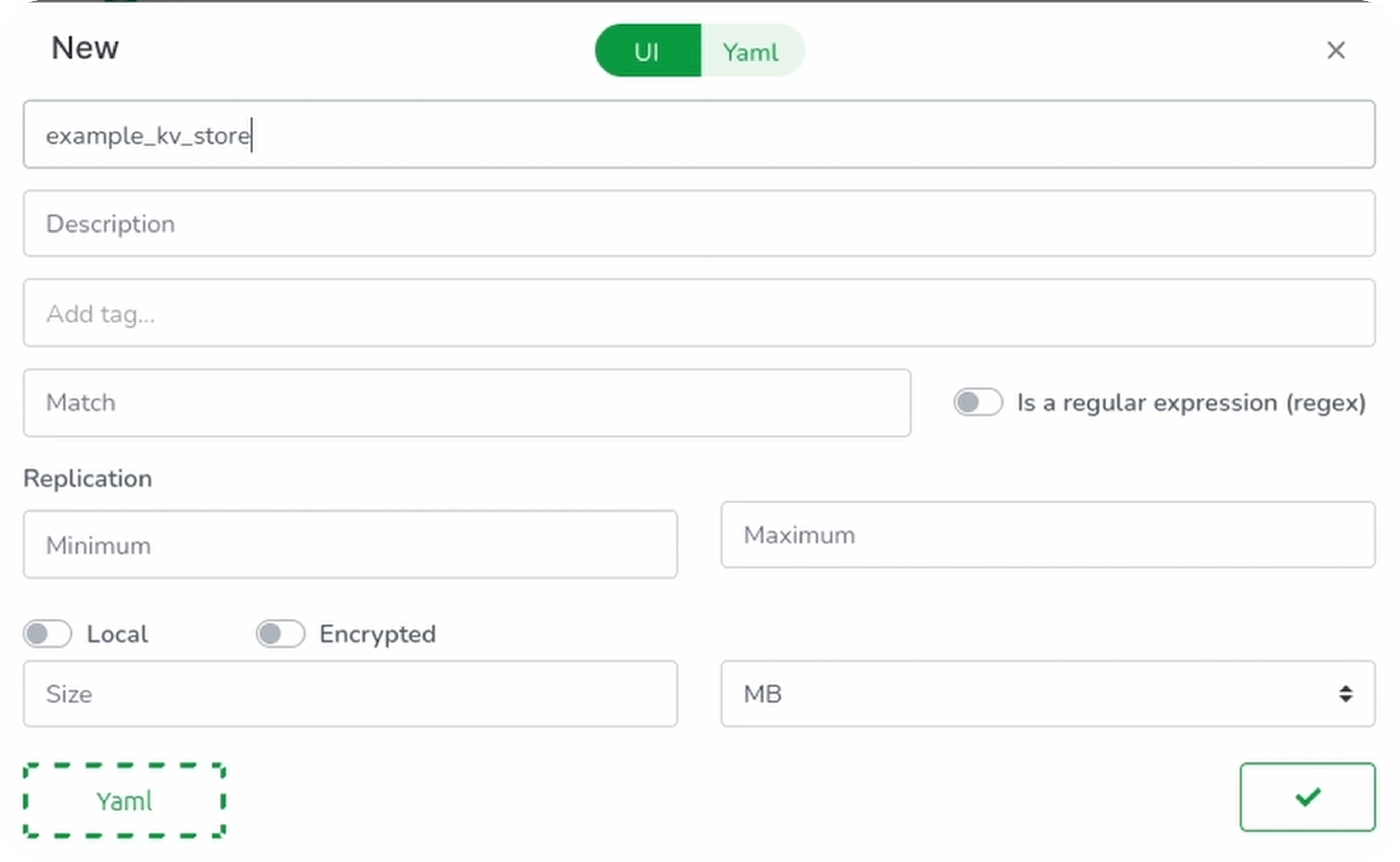
Configure your database:
| Field | Description | Example |
|---|---|---|
| Name | Unique identifier | example_kv_store |
| Matcher | Path pattern | /example/kv |
| Min Replication | Minimum copies | 1 |
| Max Replication | Maximum copies | 2 |
| Size | Maximum capacity | 100MB |
Click Validate to save.
Understanding Matchers
Just like storage, the matcher can be any string or regular expression. Using a path-like format (e.g., /example/kv) keeps things organized and readable.
Note: This configuration only exists locally in your browser’s virtual file system. Click the green button to push it to GitHub.
How Databases Work
Taubyte databases are instantiated on-the-fly the first time you use them. This enables powerful patterns:
Static matcher:
/example/kv
Dynamic matcher (regex):
profile/history/[a-zA-Z0-9]+
With the regex matcher:
profile/history/userA→ Creates a database for User Aprofile/history/userB→ Creates a separate database for User B
This is incredibly useful for multi-user applications—you can isolate data per user without manually creating each database.
Building Database Functions
Let’s create two functions to interact with our database:
- KV Set: Store a key-value pair
- KV Get: Retrieve a value by key
Set Function
Navigate to Functions and click +:
| Field | Value |
|---|---|
| Name | kv_set |
| Memory | 10MB |
| Method | POST |
| Path | /api/kv |
| Entry Point | set |
Switch to the Code tab and paste:
package lib

import (
    "encoding/json"

    "github.com/taubyte/go-sdk/database"
    "github.com/taubyte/go-sdk/event"
    http "github.com/taubyte/go-sdk/http/event"
)

func fail(h http.Event, err error, code int) uint32 {
    h.Write([]byte(err.Error()))
    h.Return(code)
    return 1
}

type Req struct {
    Key   string `json:"key"`
    Value string `json:"value"`
}

//export set
func set(e event.Event) uint32 {
    h, err := e.HTTP()
    if err != nil {
        return 1
    }

    // (Create) & Open the database
    db, err := database.New("/example/kv")
    if err != nil {
        return fail(h, err, 500)
    }

    // Decode the request body
    reqDec := json.NewDecoder(h.Body())
    defer h.Body().Close()

    // Decode the request body
    var req Req
    err = reqDec.Decode(&req)
    if err != nil {
        return fail(h, err, 500)
    }

    // Put the key/value into the database
    err = db.Put(req.Key, []byte(req.Value))
    if err != nil {
        return fail(h, err, 500)
    }

    return 0
}
Validate and push the function.
Get Function
Clone the kv_set function and modify:
| Field | Value |
|---|---|
| Name | kv_get |
| Method | GET |
| Entry Point | get |
Update the code:
package lib

import (
    "github.com/taubyte/go-sdk/database"
    "github.com/taubyte/go-sdk/event"
    http "github.com/taubyte/go-sdk/http/event"
)

func fail(h http.Event, err error, code int) uint32 {
    h.Write([]byte(err.Error()))
    h.Return(code)
    return 1
}

//export get
func get(e event.Event) uint32 {
    h, err := e.HTTP()
    if err != nil {
        return 1
    }

    key, err := h.Query().Get("key")
    if err != nil {
        return fail(h, err, 400)
    }

    db, err := database.New("/example/kv")
    if err != nil {
        return fail(h, err, 500)
    }

    value, err := db.Get(key)
    if err != nil {
        return fail(h, err, 500)
    }

    h.Write(value)
    h.Return(200)

    return 0
}
Validate and push.
Building and Testing
Trigger the build:
dream inject push-all
Test Set
Once the build is done, you can test the function by sending a POST request to the endpoint:
curl -X POST http://your-domain.blackhole.localtau:14529/api/kv -H "Content-Type: application/json" -d '{
  "key": "message",
  "value": "hello world!"
}'
Note: Replace
your-domain.blackhole.localtauwith your own domain and14529with your own port.
Unless the curl fails, we now have a key message that contains hello world! in our database.
Test Get
Wait for the build to finish, then test the function by sending a GET request to the endpoint:
curl http://your-domain.blackhole.localtau:14529/api/kv?key=message
Output:
hello world!
Database Operations
| Operation | Method | Description |
|---|---|---|
Open(path) | - | Open or create a database |
Put(key, value) | - | Store a key-value pair |
Get(key) | - | Retrieve value by key |
Delete(key) | - | Remove a key-value pair |
List(prefix) | - | List keys with prefix |
Close() | - | Close database connection |
Replication
The replication settings control data durability:
| Setting | Description |
|---|---|
| Min Replication | Minimum copies across nodes |
| Max Replication | Maximum copies for redundancy |
Higher replication = more durability, more storage used.
Conclusion
You’ve learned how to:
- Create databases with configurable replication
- Build set/get functions for key-value operations
- Use dynamic matchers for per-user data isolation
Taubyte’s on-the-fly database creation eliminates the need to pre-provision databases, making it perfect for dynamic, multi-tenant applications.
Next, explore Messaging with Pub/Sub for real-time communication.